


Track Credit Card Application Status Online

Loading your search...
You can check your credit card application status online on the issuing bank's website or app, or in your BankBazaar account if you applied through BankBazaar, using your application number and registered mobile number. You can also check offline by phone, SMS or a branch visit. The status will show In Process, Dispatched, On Hold, Disapproved or No Records Found.

Documents required to check your credit card status
You must keep the following documents ready for easy verification and quick assistance to check the status of your application:
- Application Number
- PAN Card number
- Form number
- Date of birth
General Steps to Track Your Credit Card Application Online
Tracking the status of your application has become more streamlined in 2026, often incorporating two-factor authentication for security. You must follow the steps given below in order to track your application status:
- Step 1: Visit the bank's official website or log into their mobile banking app.
- Step 2: Locate and click on the 'Track Application' or 'Check Application Status' link, usually found under the 'Cards' or 'Borrow' menu.
- Step 3: Enter the required credentials, such as your Application Reference Number (ARN), PAN number, or registered mobile number.
- Step 4: Complete the OTP verification sent to your registered mobile number.
- Step 5: Current status of your credit card application will be displayed on verification.
- Step 6: You can use the bank’s AI Chatbot for an instant update or visit a physical bank branch with your ID for a manual status check.
How to Check BankBazaar Credit Card Application Status
BankBazaar offers a streamlined digital platform to apply for credit cards online, providing access to an extensive selection from various leading banks. Their website enables you to compare essential features such as reward points, joining benefits, annual fees, and other critical details side-by-side. By utilizing the information you provide, the platform also allows you to check your eligibility for specific cards instantly. Whether you are seeking premium rewards, airline miles, or cashback offers, you can find a diverse array of credit card products tailored to your financial requirements.
The credit card application services are provided on the website as well as on the BankBazaar app. The BankBazaar app is available for Android and iOS mobile phones. The app also lets you compare and apply for various types of financial products and services. The website and app will assist you in keeping a track of the status of your application.
Once you have submitted your application, you can follow these steps to check the application status:
- Step 1: Click on 'Track Application' on the BankBazaar website.
- Step 2: Alternatively, open the BankBazaar app.
- Step 3: Log in to your BankBazaar account with the OTP sent to your registered mobile number, or sign in with Google.
- Step 4: Go to the applications section of your BankBazaar account to view the current status of your credit card application.
By following these steps, you will be able to view the status of your application instantly. The page will also provide you with important information related to your credit card.

Steps to Check Credit Card Application Status Offline
If you are someone who is not comfortable with online methods of checking the status, you can also check your credit card application status offline. Here are some common ways:
- Through Customer Care:
- Call the customer care number of the issuing bank or NBFC.
- The support representative will request your application or reference number and provide the application status.
- Some NBFCs or banks also offer dedicated customer care lines for credit card inquiries.
- By Visiting the Branch:
- Visit the nearest bank branch or NBFC branch to check your application status.
- Generally, the helpdesk representative will ask for your application number and registered mobile number.
- Through SMS:
- Some banks provide the option to check application status via SMS.
- Send an SMS in the specified format to the correct number from the mobile number registered with the bank.
- You will receive the application status via SMS.
Possible Results for Credit Card Application Status Check
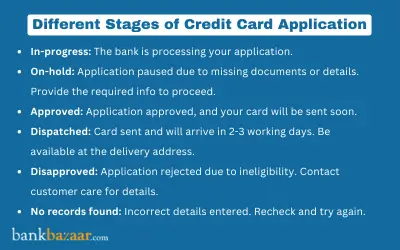
After checking your credit card application status, it's helpful to understand the meaning behind each status update. Here are the possible stages your application might be in:
- In Process: This status signifies that your application is undergoing active review. During this stage, the bank verifies your submitted documentation and initiates a hard inquiry into your credit history through bureaus like CIBIL. Once the internal assessment and KYC verification are complete, the bank will finalize the decision to approve or reject your request.
- Dispatched: When the status shows 'Dispatched', your application has been officially approved and the physical card is being shipped via courier. While the physical card typically arrives within three to five business days, many banks in 2026 now grant immediate access to a virtual version of the card via their app for instant online use.
- On Hold: This indicates a temporary pause in the process, often due to incomplete documentation, a pending Video KYC (V-KYC), or a delay in receiving your latest credit report. The bank may require additional information or a re-upload of specific files, so reaching out via their helpline or email is recommended to resolve the bottleneck.
- Disapproved: A 'Disapproved' status means the bank has declined the application. This is commonly due to an inadequate credit score, high existing debt-to-income levels, or failure to meet specific eligibility benchmarks. You can contact the bank for a formal explanation to understand which criteria were not met before re-applying in the future.
- No Records Found: This typically occurs if the details provided such as the application ID or mobile number do not match the bank's database exactly. It can also happen if there is a synchronization delay between the application submission and the tracking portal. Verify your inputs for formatting errors, ensure you are using the registered mobile number, and try submitting the request again.
If your credit card application is rejected, RBI rules require the card issuer to convey in writing the specific reason or reasons that led to the rejection, so you know what to work on before you apply again.
Once your credit card application status shows 'Dispatched', remember to activate the card. If a new credit card is not activated for more than 30 days from the date of issue, RBI rules require the card issuer to seek your OTP-based consent to activate it, and if you do not give consent, the issuer must close the card account at no cost to you within seven working days of seeking confirmation.

Track your Credit Card Application Online by Banks
Each bank differs slightly in displaying the same information. Some of them are given below:
SBI Credit Card Application Status
Follow the steps given below to check your SBI Credit Card status online:
- Step 1: Visit the official SBI Card website and click on the 'Credit Cards' tab on the navigation bar
- Step 2: Click on sbi status link 'Track Your Application'.
- Step 3: Click on the 'Track Application' tab and enter the application number.
- Step 4: Alternatively, you can also click on the 'Retrieve Application' tab.
- Step 5: Enter your first name and the mobile number used in your application, then verify with the OTP sent to that number.
- Step 6: Click on the Retrieve button to open your partially filled SBI Card application and complete it.
SBI Card's overall turnaround time for the application process is 21 days from the date you submit your application and all required documents. SBI Card also sends an SMS to your registered mobile number with a link to generate an e-card, so you can view your card details and shop online before the physical card reaches you.
IndusInd Bank Credit Card Application Status
If you are an IndusInd Bank Credit Card cardholder, you can check the status of your credit card with the following easy steps:
- Step 1: Visit the IndusInd Bank credit card application status page.
- Step 2: Once you go to the link, all you have to do is enter the application Id and mobile number that you have provided in the application for the credit card.
- Step 3: Once both the fields are entered, the site will display the credit card application status
You can also know the status of your application by calling the helpline number 1860-267-7777.
HSBC Credit Card Application Status
The bank provides regular status updates via SMS to your registered mobile number throughout the processing period. You can also manually track your progress through a secure and simplified online portal. You can access the details with these steps:
- Step 1: Visit the official HSBC website and navigate to the dedicated credit card application tracking page.
- Step 2: Enter your unique Application Reference Number (ARN) provided during submission.
- Step 3: Provide your registered mobile number, then complete the OTP verification sent to that number.
- Step 4: Once the information is verified, the site will display the real-time status of your credit card application.
Axis Bank Credit Card Application Status
The process to track the status of an Axis Bank Credit Card application is quite straightforward. You can access the details with the steps mentioned below:
- Step 1: Visit the dedicated Axis Bank website.
- Step 2: From the three options on the menu bar, select 'Track Your Application'
- Step 3: Enter your application ID, click 'Submit' and you will be able to retrieve the status of your credit card application at Axis Bank.
HDFC Credit Card Application Status
Track HDFC Credit Card status just with the simple steps mentioned below
- Step 1: Visit the official HDFC credit card application tracking page.
- Step 2: Enter your registered mobile number.
- Step 3: Then, enter any ONE of the following: your 16-digit application reference number, your form number, or your date of birth.
- Step 4: Click “Submit” after completing the captcha.
You can also use Net Banking or Mobile App or call on 1800-1600 or 1800-2600.
RBL Credit Card Application Status
To know the status of your RBL Credit Card application, follow the steps given below:
- Step 1: Visit the RBL Bank official website and navigate to the 'Credit Cards' section on the homepage.
- Step 2: On the right-hand side of the page, locate and click the link for 'Track My Application'.
- Step 3: Click on 'Track Here', which will redirect you to the secure page for tracking your online application status.
- Step 4: Enter your 13-digit or 14-digit application reference number and your registered mobile number as per the application.
- Step 5: Enter the OTP sent to your registered mobile number to instantly view the real-time status of your credit card application.
Standard Chartered Bank Credit Card Application Status
The most ideal way to check your status is to call the bank on (STD CODE) 66014444/ 080-49248444 / 044-47628444 using your registered mobile number. However you can also follow the steps given below:
- Step 1: Visit the official Standard Chartered Bank Website
- Step 2: Search for credit card status.
- Step 3: The status link will be displayed on the screen
- Step 4: The link displays two fields, application reference number and mobile number. Do include # when entering the application reference number
- Step 5: Once both are entered, click on the 'submit' tab and you can track the status of your application form with the bank.
ICICI Bank Credit Card Application Status
You can also track an ICICI Bank credit card application through the following steps:
- Step 1: Open the ICICI Bank iMobile app and go to Services, then Card Services, then Track Application.
- Step 2: Enter your application reference number or your registered mobile number.
- Step 3: View your current ICICI Bank credit card application status on screen.
You can also call ICICI Bank's 24x7 customer care number, 1800 1080, to check your application status offline.
Summary
Your credit card application status shows whether your application is In Process, Dispatched, On Hold, Disapproved or has No Records Found, and you can check it online through the issuing bank or your BankBazaar account, or offline by phone, SMS or a branch visit. Keep your application number and registered mobile number handy, as most banks ask for them along with an OTP. Compare and apply for credit cards on BankBazaar, then track your credit card application status from your BankBazaar account.



FAQs on Credit Card Application Status
1.What is credit card application status tracking?
Credit card application status tracking lets you see where your credit card application stands after you submit it, such as In Process, Dispatched, On Hold, Disapproved or No Records Found. You can check your credit card application status online through the bank's website or app, or offline by phone, SMS or a branch visit.
2.What documents do I need to check my credit card application status?
To check your credit card application status, keep your application number, PAN card number, form number and date of birth ready. Banks usually ask for one or more of these details, along with your registered mobile number, to verify your identity before showing the status.
3.How can I track my credit card application status online?
You can track your credit card application status online by opening the 'Track Application' or 'Check Application Status' section on the issuing bank's website or mobile banking app. Enter your application reference number, PAN or registered mobile number, complete the OTP verification, and your credit card application status is displayed on screen.
4.How do I check my credit card application status on BankBazaar?
If you applied through BankBazaar, you can check your credit card application status by clicking 'Track Application' on the BankBazaar website or opening the BankBazaar app. Log in with the OTP sent to your registered mobile number, or sign in with Google, and view your credit card application status in your account.
5.Can I check my credit card application status offline?
Yes, you can check your credit card application status offline by calling the issuing bank's customer care, visiting a branch, or sending an SMS in the bank's specified format. The bank will ask for your application or reference number and registered mobile number before sharing your credit card application status.
6.What does an “In Process” credit card application status mean?
An “In Process” credit card application status means the bank is actively reviewing your documents and checking your credit history with a credit bureau such as CIBIL. The bank completes its internal assessment and KYC verification before deciding whether to approve or reject your credit card application.
7.What does a “Dispatched” credit card application status mean?
A “Dispatched” credit card application status means the bank has approved your application and is sending the physical card to you by courier. Many banks also give you a virtual card in their app, so you can start using it before the physical card arrives.
8.Do I need to activate my card once my credit card application status shows “Dispatched”?
Yes, you should activate your new card once your credit card application status shows “Dispatched” and the card reaches you. Under RBI rules, if you do not activate the card within the permitted period, the bank must seek your OTP-based consent to activate it and close the card account at no cost to you if you do not consent.
9.What does an “On Hold” credit card application status mean?
An “On Hold” credit card application status means your application has been temporarily paused, often because of incomplete documents, a pending video KYC, or a delay in receiving your credit report. Contacting the bank and sharing any information it asks for is the quickest way to move your credit card application status forward.
10.Why would a credit card application status show “Disapproved”?
A “Disapproved” credit card application status means the bank has declined your application, commonly because of a low credit score, high existing debt, or not meeting its eligibility criteria. RBI rules require the card issuer to convey the specific reasons for rejecting a credit card application in writing, which helps you prepare before you reapply.
11.What does “No Records Found” mean when checking credit card application status?
A “No Records Found” credit card application status usually means the application ID or mobile number you entered does not match the bank's records, or the tracking portal has not yet updated. Check your details for typing errors, use the mobile number registered with the bank, and try checking your credit card application status again later.
12.Does every bank use the same process to check credit card application status?
No, each bank shows credit card application status slightly differently, though most ask for your application or reference number along with your registered mobile number. Some banks also accept your PAN, form number or date of birth, so check the specific bank's tracking page for its exact credit card application status process.
13.How do I check my SBI Card credit card application status?
You can check your SBI Card credit card application status on the SBI Card 'Track your Application' page by opening the 'Track Application' tab and entering your application or reference number. The 'Retrieve Application' tab is only for resuming a partially filled SBI Card application, not for checking its status.
14.How do I check my HDFC Bank credit card application status?
To check your HDFC Bank credit card application status, open HDFC Bank's credit card tracking page and enter your registered mobile number with your application reference number, form number or date of birth. You can also check your HDFC Bank credit card application status through NetBanking, the MobileBanking app or PhoneBanking.
15.How do I check my ICICI Bank credit card application status?
You can check your ICICI Bank credit card application status in the iMobile app by going to Services, then Card Services, then Track Application. Enter your application reference number or registered mobile number to see your ICICI Bank credit card application status, or call ICICI Bank customer care.
Types of Credit Card
- Top 10 Credit Cards in India
- Fuel Credit Cards
- Lifetime Free Credit Cards
- Kisan Credit Card
- Student Credit Cards in India
- Shopping Credit Cards
- Contactless Credit Cards
- Travel Credit Cards
- Co-Branded Credit Cards
- Lifestyle Credit Cards
- Rewards Credit Cards
- Business Credit Cards
- NRI Credit Cards
- Cashback Credit Cards
- Lounge Access Credit Cards
Credit Card by Banks
- Axis Bank Credit Card
- HDFC Bank Credit Card
- Kotak Bank Credit Card
- Federal Bank Credit Card
- SBI Credit Cards
- HSBC Credit Card
- IndusInd Bank Credit Card
- RBL Bank Credit Card
- Standard Chartered Credit Card
- YES Bank Credit Card
- Canara Bank Credit Card
- Punjab National Bank Credit Card
- Bank of Baroda Credit Card
- IDBI Credit Card
- Union Bank of India Credit Card
- Bank of India Credit Card
Articles on Credit Card
- How to Check Credit Card Status
- How to Manage Multiple Credit Cards
- Best Credit Card for Poor Credit
- How to get Credit Card without Job
- Credit Card Insurance Benefits
- How to Apply for Lost Credit Card
- Reasons for Credit Card Rejection
- Advantages & Disadvantages of Credit Card
- Difference between Credit Card & Debit Card
Credit Card Customer Care
- SBI Credit Card Customer Care
- HDFC Bank Credit Card Customer Care
- Axis Bank Credit Card Customer Care
- Federal Bank Credit Card Customer Care
- IndusInd Bank Credit Card Customer Care
- PNB Credit Card Customer Care
- RBL Bank Credit Card Customer Care
- Kotak Credit Card Customer Care
- Yes Bank Credit Card Customer Care
- Standard Chartered Credit Card Customer Care
- Canara Bank Credit Card Customer Care
- HSBC Credit Card Customer Care
- Indian Bank Credit Card Customer Care
- Bank of Baroda Credit Card Customer Care
- Bank of India Credit Card Customer Care
- Union Bank of India Credit Card Customer Care
Credit Card Bill Payment
- Credit Card Bill Payment
- SBI Credit Card Bill Payment
- HDFC Credit Card Bill Payment
- Federal Bank Credit Card Bill Payment
- Axis Bank Credit Card Bill Payment
- IndusInd Credit Card Bill Payment
- Kotak Credit Card Bill Payment
- Standard Chartered Credit Card Bill Payment
- RBL Bank Credit Card Bill Payment
- HSBC Credit Card Bill Payment
- PNB Credit Card Bill Payment
- Canara Bank Credit Card Bill Payment
- Bank of Baroda Credit Card Bill Payment
- Bank of India Credit Card Bill Payment
- Union Bank Credit Card Bill Payment
Credit Card Eligibility
- Credit Card Eligibility
- SBI Credit Card Eligibility
- HDFC Credit Card Eligibility
- Federal Bank Credit Card Eligibility
- Axis Bank Credit Card Eligibility
- Yes Bank Credit Card Eligibility
- IndusInd Bank Credit Card Eligibility
- HSBC Credit Card Eligibility
- Kotak Credit Card Eligibility
- Canara Bank Credit Card Eligibility
- Standard Chartered Credit Card Eligibility
- RBL Bank Credit Card Eligibility
- Bank of Baroda Credit Card Eligibility
- Union Bank Credit Card Eligibility

Disclaimer
Credit Card:
Credit Score:
Personal Loan:
Home Loan:
Fixed Deposit:


Copyright © 2026 BankBazaar.com.